 fabrica
I got tired of watching agents improvise my local stack: no easy way to peek at running versions of their work, zombie processes to clean up by hand, and separate environments for humans and agents.
My project has a fairly normal modern dev setup. Server. App UI. Public UI. Notifications. Image worker. Analytics worker. GraphQL codegen. Postgres and MailHog underneath.
For a long time, the orchestration for booting my local dev environment lived in .vscode/tasks.json or a .sh to open all the terminals.
That worked perfectly when I was the only operator. I knew which task to run. VS Code knew how to start the services. The logs lived in terminal tabs. Status was whatever I could see on screen.
Then agents started doing more and more real work in parallel instances of the repo. They could read files, run commands, edit code, and run tests. But the dev environment was still hidden inside an IDE task tree.
The first thing we sorted out was running on distinct ports and a database schema per branch. That enabled the required parallelism, but I could never attach to agent work in progress, and there were separate procedures for a human work environment and an agent work environment.
None of that was an AI problem. It was an interface problem.
One stack, two interfaces
The fix was to stop treating the dev environment as an IDE convenience.
I moved the stack to process-compose and put a thin wrapper around it:
bash tools/devenv.sh up
bash tools/devenv.sh ready
bash tools/devenv.sh status
bash tools/devenv.sh logs server -f
bash tools/devenv.sh restart server
bash tools/devenv.sh down
Humans can attach to the TUI (Terminal User Interface) from the same tasks.json launch as before. Agents can use CLI output, JSON, or the REST API.
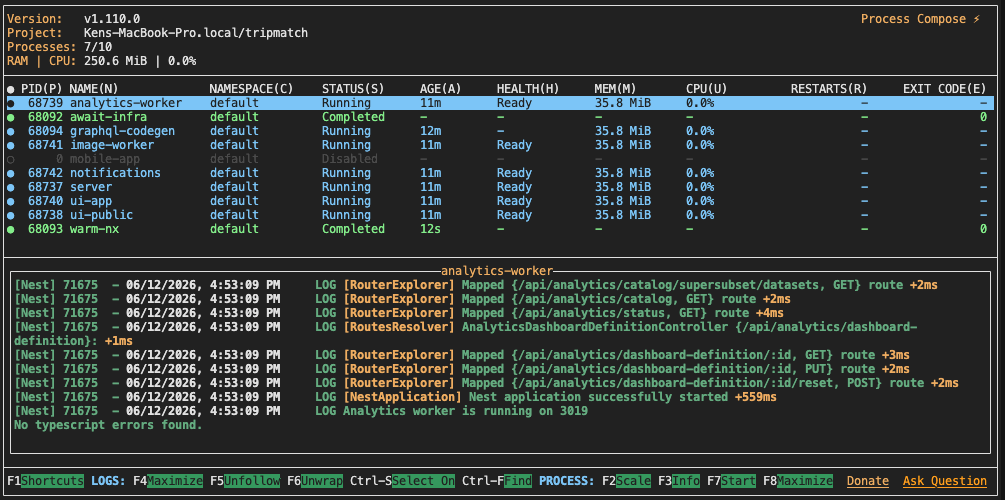
Same daemon, same services, same logs, same readiness state.
If I launched the stack from VS Code, I had one experience. If an agent launched services in a worktree, it had another. That split created small coordination failures all the time.
The better model is one running stack with multiple ways to operate it.
A human wants a live screen. An agent wants structured output. Both need the same answer to basic questions:
- Is the stack running?
- Which service is unhealthy?
- What port is this checkout using?
- Where are the logs?
- Can I restart just the server?
Benefits I’ve enjoyed in the human interface:
- Processes survive IDE restarts
- Port numbers at my fingertips for manual testing
- Instant access to logs, CPU and memory for any local development process launched by me or my agent
Ready does not mean “port open”
The most useful change was the ready command.
Old status checks mostly answered: is something listening on this port?
A server can have an open port while it is stuck mid-recompile. A frontend can be running but still serving stale or broken output. GraphQL can be reachable enough to accept a TCP connection and still not be ready for the next step.
An agent will happily build on a false positive. It has no intuition that the service is “probably still warming up” unless you give it a command that encodes that.
The stack now has readiness probes. The server has to return a real GraphQL response. The UI has to answer over HTTP. Each worker has to answer on its own endpoint. devenv.sh ready blocks until the useful services are actually useful.
Instead of:
npx nx run server:serve
# wait? maybe?
# tail something?
# try curl?
the agent can do:
bash tools/devenv.sh up
bash tools/devenv.sh ready
If readiness fails, it can inspect the specific process logs. If the server wedges after a library change, it can restart just the server.
Agents need that kind of boring control surface.
Parallel work needs parallel environments
The other piece was parallel local work.
I use worktrees a lot. An agent can work on one issue branch while I keep the main checkout running. Another agent can work on a different branch. That only works if each checkout has its own environment.
The code can be isolated by Git. The running services need the same treatment.
The project now does three things:
- each branch gets its own worktree
- each worktree gets its own set of ports via a “slot”
- each branch gets its own database schema
The slot lives in .env as DEVENV_SLOT.
Slot 0 is the main checkout. A worktree might be slot 8. App ports are derived from that slot. The process-compose REST port is derived from that slot too.
The database schema is branch-specific, so the agent can run migrations, seed data, and smoke tests without trampling whatever I have open in the main checkout.
The command stays the same everywhere:
bash tools/devenv.sh statusRun it from the checkout you care about. It controls that checkout’s stack and reports that checkout’s URLs.
Where this fits
There is already a lot of work around agent development environments.
GitHub Copilot’s coding agent has setup steps for preparing its environment before the agent starts work. Codex cloud tasks run inside configured containers. Claude Code can read files, run commands, and operate locally, with a lot of attention now going into permissions and sandboxing. Dev Containers, Nix, Flox, Codespaces, and similar tools all point in the same general direction: make the environment reproducible.
The running app stack is another layer.
A container can give an agent the right tools. It does not automatically tell the agent whether the GraphQL server is ready, which worktree owns port 4280, or where to find the analytics worker logs. A setup script can install dependencies. It does not give the agent a clean way to restart one process after a local codegen issue.
That is the gap this change closed for me.
It was a process-compose.yaml, a wrapper script, a small .ai/skills/devenv note, and deleting a bunch of old VS Code task sprawl.
The important part was the contract:
- one entry point
- one supervisor
- real readiness
- structured status
- shared logs
- deterministic ports
If the agent has to guess, it will guess. If the dev environment gives it a small API, it can do the boring thing correctly.
A prompt to steal
If I were starting from scratch, I would hand an agent something like this:
Our local dev stack is currently started through IDE tasks and ad-hoc shell commands.
Replace it with one tool-agnostic local dev control plane that both humans and AI agents can use.

Use process-compose unless there is a clear reason not to.

Requirements:
- Add a process-compose.yaml that runs the local app services.
- Add readiness probes for each service. Readiness must mean a real useful response, not only "port is open."
- Add a thin wrapper script at tools/devenv.sh. It should be the only supported entry point.
- The wrapper should support: up, ready, status, status --json, logs <service>, restart <service>, urls, and down.
- up and down must be idempotent. Running up twice must not duplicate processes, and down must leave nothing running.
- ready must time out and exit nonzero naming the failing service. It must never hang forever. logs should print and exit by default, with -f to follow.
- Humans should be able to attach to a TUI.
- Agents should be able to use CLI commands and machine-readable status.
- Support parallel worktrees. Each checkout should get a deterministic slot from .env.
- Derive app ports and the process-compose control port from that slot.
- Avoid port collisions across slots. Check the actual base-port gaps before choosing a stride.
- If the app uses a local database, give each branch/worktree an isolated schema or database.
- Keep shared infrastructure, such as Postgres or MailHog, explicit. Do not accidentally start one copy per worktree unless that is intended.
- Update README and agent instructions so humans and agents use the same commands.
- Remove or deprecate old IDE-only tasks that start app services directly.

Acceptance checks:
- From a fresh checkout, I can run tools/devenv.sh up and tools/devenv.sh ready.
- tools/devenv.sh status shows process state, readiness and port numbers.
- tools/devenv.sh status --json is usable by an agent without scraping terminal UI.
- tools/devenv.sh logs server and tools/devenv.sh restart server work.
- Running tools/devenv.sh up twice does not create duplicate processes, and down leaves no orphans.
- When a service cannot become ready, tools/devenv.sh ready fails and says which service, instead of hanging.
- Two worktrees can run at the same time without port or database collisions.
- The docs clearly say that agents should not start app services ad-hoc.
Edit the details for your stack. Swap process-compose out if you want.